Skills framework starter kit
An open-source kit to help you design and publish your own human and AI-readable skills framework
AI coding tools — GitHub Copilot, Claude, Cursor, and others — have quietly removed the biggest barrier to building software: the need to know how to code. Without any programming background, you can now describe what you want and watch a working web tool, SCORM package, or data dashboard take shape in front of you.
But writing code without developer habits is a bit like driving a car without knowing the Highway Code. You might get where you’re going. You might not.
The good news is that the habits themselves are not complicated. Here are some practices I’d recommend adopting from day one, drawn from how experienced developers work. Follow them and you will significantly reduce the risk of your AI agent breaking things, going in circles, or producing code that works today but falls apart tomorrow.
When you ask an AI agent to build something, it needs a consistent environment to work in — specific tools, versions, and settings that match your project. Without one, the agent might make assumptions that work on your machine but fail when you (or someone else) tries to run the project elsewhere.
A development container (or “dev container”) solves this by packaging everything the project needs into a single, portable setup. VS Code makes this straightforward with its Dev Containers extension. You define the environment once, and from that point on, the agent — and anyone else on the project — is always working in exactly the same conditions.
Think of it like a self-contained workshop. Everything is in its place. The right tools are on the bench. Nothing goes missing between sessions.
Even more importantly, a container keeps the AI agent’s operations separate from the rest of your computer. It’s like a solid barrier between the agent and all your other important stuff.
This is the step most non-coders skip, and it is the one that causes the most trouble later.
A specification does not need to be long or formal. It just needs to answer two sets of questions clearly.
Functional requirements describe what the product must do. What are the key features? What does the user experience need to look like? What must the end result actually achieve?
Non-functional requirements describe the constraints. Does it need to be accessible? How fast should it load? What devices will people use it on? Does it need to comply with any standards?
Two more things worth nailing down before you start:
If you’re not sure about which frameworks to use, ask the AI to recommend ones that will work for your context.
AI coding agents can be given persistent instructions — sometimes called “skills” or “instructions files” — that shape how they work throughout a project. Rather than repeating yourself on every prompt, you write the rules once and the agent follows them automatically.
For any project I work on, I would create instructions covering at least three areas:
Writing these instructions is a one-off investment that pays dividends every time you start a new project. The same instructions can be reused and refined over time. Again, if you’re not sure - ask the AI agent to help you write them.
If there is one developer habit I would make compulsory, it is this one.
Version control — using a tool like Git — keeps a complete history of every change made to your project. If the AI agent does something catastrophic (and it will, eventually), you can roll back to a working state. Without version control, a bad change can mean starting from scratch.
You do not need to become a Git expert. Three concepts will take you a long way:
GitHub Desktop or the built-in Git tools in VS Code make this manageable without touching the command line.
Once you have your specification, ask the agent to produce an implementation plan before it writes any code. This serves two purposes.
First, it forces the agent to think through the whole project and identify dependencies — things that need to happen before other things can happen. Second, it gives you a chance to review the approach and raise concerns before work begins. Changing direction halfway through a build is expensive, even with AI.
The plan does not need to be exhaustive. A structured list of steps, in a sensible order, is enough. What you are avoiding is the agent jumping straight to implementation, making assumptions, and then having to backtrack.
An implementation plan is useful. An implementation plan broken into small, completable tasks is much more useful.
The principle here is the same as in any well-run project: large, vague tasks are hard to delegate, hard to track, and easy to declare “done” before they really are. Small, specific tasks are the opposite.
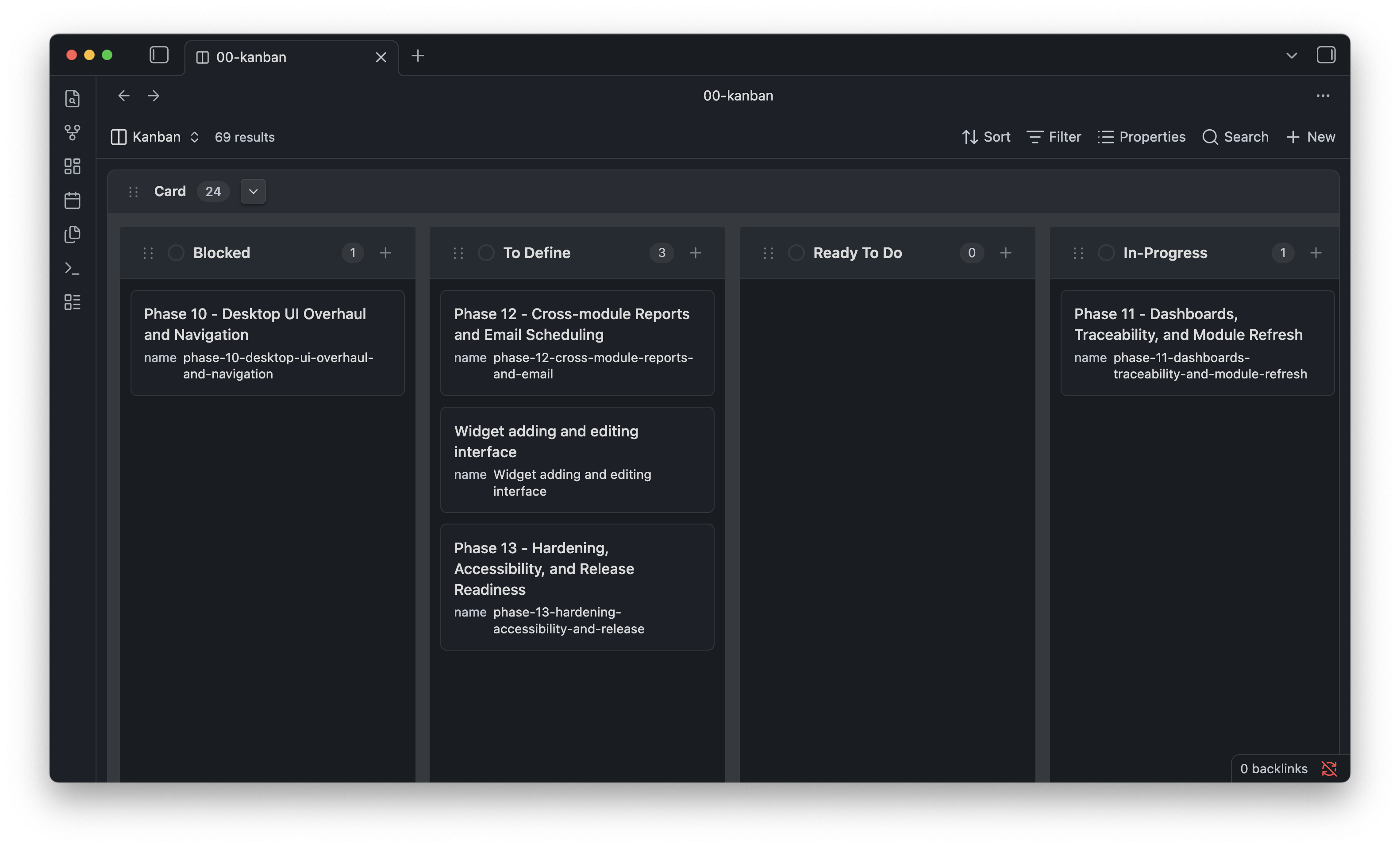
I use the Kanban Bases View plugin for Obsidian to manage this. Each task from the implementation plan becomes a card, which moves through columns: To Do → In Progress → Done. It is simple, local, and doesn’t need a subscription to another service.
The key discipline is to give the agent one card at a time. Complete it, review it, commit the result, then move to the next. This keeps changes small and reviewable, and makes it much easier to identify where something went wrong if it does.
One of the underappreciated advantages of AI-built code is that the agent can write the tests as well as the code itself. This is something professional developers do as a matter of course, but it is easy to skip when you are not from a development background.
There are a few levels of testing worth knowing about:
You do not need to write these tests yourself. Ask the agent to write them as part of each task. Then, whenever you make a change, you can run the tests and know immediately whether anything has broken. This is especially valuable when you are asking the agent to refactor or extend something that is already working.
You don’t need to understand every line of code to maintain a useful oversight of it. There are a few questions worth asking the agent periodically — perhaps at the end of each major phase — to keep the codebase healthy.
Is it modular? Good code is organised into small, focused components, each responsible for one thing. If everything is tangled together in one large file, it becomes very difficult to change one thing without accidentally breaking another.
Does it repeat itself? The principle here is “Don’t Repeat Yourself” (DRY). If the same logic or presentation code appears in multiple places, a change in requirements means updating it in multiple places — and missing one. Ask the agent to identify and consolidate any repetition.
Is presentation separated from logic? The content and layout of what users see should be kept separate from the code that makes things work. HTML or templates handle the presentation; JavaScript or other code handles the behaviour. When these are mixed together, even small changes become disproportionately risky.
None of this requires you to become a programmer. It requires you to ask the right questions and trust that a well-maintained codebase is a significant asset — and a poorly maintained one is a significant liability.
These practices will not make you a developer. But they will give you enough of a developer’s mindset to use AI coding tools responsibly, to know when something has gone wrong, and to build things that are worth building.
If you'd like to discuss this article, or how I can help you, get in touch.
Posted: 19 May 2026
Tags: Solution design Project management
An open-source kit to help you design and publish your own human and AI-readable skills framework
Was elearning as we know it just a temporary detour?
Rebalancing the spend on learning by building a target operating model for informal learning
How we can now move away from the course being the default unit of learning
With the rise of the AI content creation tools, do we still need elearning authoring software?
A dive into this new technology